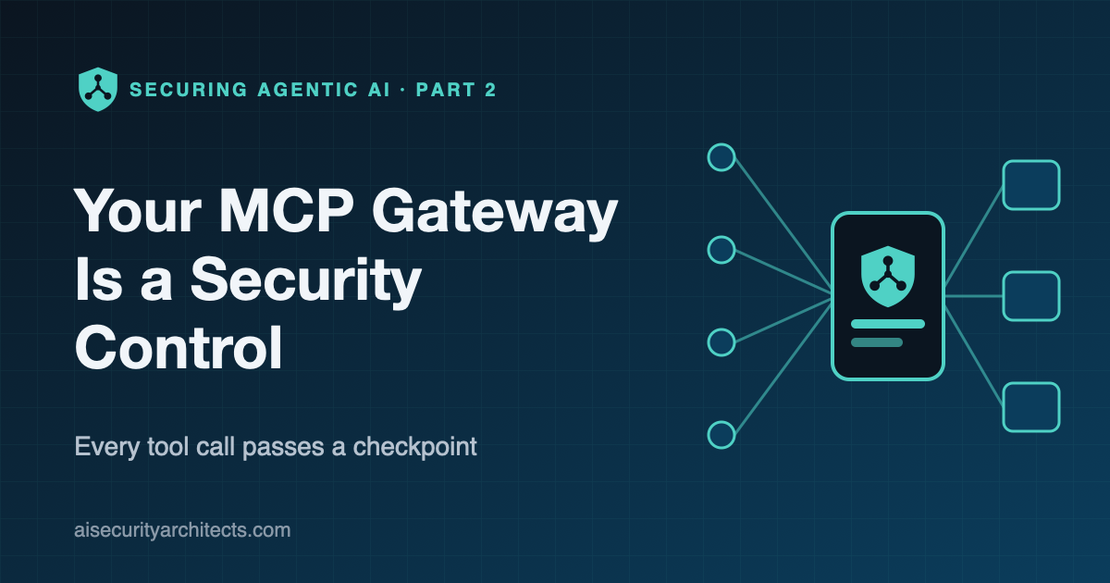
Your MCP Gateway Is a Security Control, Not a Convenience
- Andre Barrett
- MCP , Agentic AI
- September 14, 2026
Table of Contents
When a platform team proposes an MCP gateway, the pitch is almost always about convenience. One endpoint instead of fifty. No more configuring every developer’s laptop. Fewer API keys floating around.
All true. But if that’s the only reason you’re building one, you’re missing the point.
An MCP gateway is the one place where every AI tool call in your organization can be seen, checked and stopped. Designed as a convenience, it’s a routing layer. Designed as a security control, it’s the checkpoint that makes agentic AI governable.
In the previous article I explained the Model Context Protocol and why tool descriptions have to be treated as untrusted input. This article is about the control that sits in the middle: what an MCP gateway should do, how I’d design it, and what it can’t do for you.
Why you need an MCP gateway: the problem in plain English
Without a gateway, every AI assistant and agent connects directly to every MCP server it uses. That looks harmless in a pilot. At scale it looks like this:
- Every developer configures their own connections, with their own copies of API keys.
- Every MCP server implements (or doesn’t implement) its own authentication.
- Nobody has a list of which AI tools are connected to which systems.
- When something goes wrong, there’s no single place to look.
Ask yourself three questions about your own environment:
- Could you list every MCP server your people are connected to right now?
- Could you revoke one person’s access to one tool without breaking everyone else?
- Could you show an auditor every tool an AI called on a given person’s behalf last week?
If any answer is no, you don’t have a tooling problem. You have a control problem.
Let me paint a picture
Think about how a well-run office building handles visitors.
Nobody walks straight from the street to the finance floor. They sign in at reception. Reception checks who they are and who they’re visiting, and gives them a badge. The badge opens the doors they need and nothing else. Every door they open is logged. If a visitor causes trouble, security can deactivate that badge in seconds without locking everyone else out of the building.
Now imagine the same building with no reception, where every department hands out its own keys, some of them copied, many never returned.
That second building is what most organizations’ AI tool access looks like today.
An MCP gateway is the reception desk. The question is whether you staff it with a receptionist who just points people to the lift, or with security.
Now what?
Why “each server handles its own security” isn’t enough
The obvious alternative is to require every MCP server to do its own authentication and authorization. It sounds principled, but it breaks down for two reasons.
You can’t enforce a standard you can’t see. With dozens of servers built by different teams and vendors, some will get authentication right, some will get it partly right, and some will skip it “because it’s internal”. You’ll only find out which is which after an incident.
Policy ends up scattered and inconsistent. Who may use which tool becomes a decision buried in each server’s configuration. There’s no single place to answer “what can this person’s AI do?” and no single place to change it.
A gateway doesn’t replace good security in each server. It gives you a consistent floor that every server sits above.
MCP gateway security principles
If you only take one section of this article back to your team, take this one.
- Every tool call passes a checkpoint. No AI client talks to a remote MCP server except through the gateway. Direct routes are closed, not just discouraged.
- Identity first. Every request carries a verified identity: a person, or an agent with its own service identity. No anonymous calls and no shared “team” tokens.
- Authorize the tool, not just the server. Decisions are made per server, per protocol method and per tool, and anything not explicitly allowed is denied.
- Show the AI only what it may use. An AI should only learn about the tools its user is allowed to call.
- Keep credentials out of users’ hands, and out of the model. The gateway holds the credentials for downstream servers, the caller’s own token is never passed on, and no token ever sits in the model’s context.
- Log everything that matters, and nothing that’s secret. Every call is recorded with who, which server and which tool. Tokens and keys are never logged.
- Assume the gateway is a target. It’s now the most valuable system in the path, so it gets crown-jewel protection.
MCP gateway architecture
My team built the gateway and registry behind our own AI platform around these principles. We wrote it in Go, drawing on the design of the open-source MCP Gateway & Registry project. Conceptually, the design has four parts.
flowchart TB
    C["AI assistants and agents"] --> GW["Gateway entry point"]
    GW --> AUTH["Identity check
(your identity provider)"]
    AUTH --> POL{"Policy check
server, method, tool"}
    POL -->|"deny"| LOG1["Refuse and log"]
    POL -->|"allow"| CRED["Forward with the server's own credential
(never the caller's token)"]
    CRED --> S["Approved MCP server"]
    S --> F["Return result"]
    F --> C
    F -.-> AUD["Audit log"]
    LOG1 -.-> AUD
1. Identity: know exactly who is calling
The gateway sits behind your existing identity provider (we support Entra ID, Okta, Keycloak, Cognito, Auth0 and generic OAuth), so AI access follows the same joiner, mover and leaver process as everything else.
It distinguishes three kinds of caller, each with its own flow and lifetime:
- People in a browser, who sign in with single sign-on.
- Programmatic clients such as coding assistants, which use short-lived tokens issued for a specific person and can be narrowed to fewer permissions than that person holds.
- Autonomous agents and automation, which get their own service identities through the standard OAuth client credentials flow.
The gateway also publishes the standard OAuth discovery documents defined in the MCP specification, so compliant AI clients can find out how to sign in without hand-configuration.
The result: every call is attributable to a real person or a named agent.
2. Authorization: decide per tool, at the edge
Permissions map your identity provider’s groups to exactly what each group may use: which servers, which protocol methods and which individual tools.
Three design details matter more than they look:
- Enforcement happens before the request reaches the server. The gateway reads which method and tool is being requested and checks it first. A denied call never touches the server.
- Nothing is allowed by default. Onboarding a new server includes defining who may use which of its tools. Until that’s done, every call is refused.
- Curated tool sets. Alongside individual servers, we publish virtual servers: a hand-picked set of approved tools from one or more backends behind a single endpoint, where each tool can require its own permissions. An AI connected to a virtual server only ever sees the tools on that list.
The result: least privilege at the level where the risk actually lives, the individual tool.
3. Credential handling: keep secrets away from people, agents and models
Many MCP servers need their own credentials: an API key for a SaaS product, a token for an internal service. In a direct model, those end up in every developer’s config. With a gateway, they should be held once, encrypted, and attached only when the gateway forwards an approved call.
The mirror image matters just as much: the caller’s own token must never be forwarded to the server. The MCP specification forbids token passthrough for good reason. A server that receives the caller’s gateway token could replay it against the gateway. This is the first thing I’d test in any gateway, whichever product you choose, along with a second: that the gateway verifies the TLS certificate of every upstream server it connects to.
And one lesson specific to AI: keep credentials out of the model’s context. It’s tempting to give an assistant a tool that mints tokens for it. But anything the model reads, a prompt injection can ask it to repeat. Tokens should flow through the client’s plumbing, not through the conversation.
The result: fewer copies of secrets, one place to rotate them, and no credentials leaking downstream.
4. Audit: an evidence trail you can actually use
Every call through the gateway is recorded with the identity, the server, the protocol method, the tool name, the result and the timing, alongside a separate record of every registry API call. Tokens, cookies and keys are never logged. Events can be queried, filtered and exported.
One practical warning: check your retention settings. Audit and application logs are often kept for days by default. That’s fine for debugging but nowhere near enough for most compliance regimes. Export logs to your SIEM and retain them to match your policy.
The result: you can answer “who caused this tool to run, and when?” in minutes, not weeks.
Two design choices worth understanding
Reverse proxy or aggregating gateway? A reverse proxy routes each server through its own path and checks every request on the way through. It’s fast, protocol-independent and scales each server separately. An aggregating gateway presents one endpoint with all tools merged together, which is simpler for users but has to understand and re-implement the protocol. From a security standpoint, both can enforce the same controls. We chose a reverse proxy for real servers and added virtual servers for curated bundles, which gives us most of the benefits of both.
One central gateway, or one per team? As more teams build MCP servers, some will ask to run their own copy of the gateway next to their services. It’s a fair request, and it buys isolation. But every extra gateway is another audit store, another set of permissions and another catalog, which is the opposite of the single control point you wanted. My default is one shared gateway that proxies to each team’s servers, with a dedicated instance reserved for teams with genuine isolation or data-residency requirements. The real work in the shared model is the plumbing: a reliable network path to each team’s servers and a repeatable way to onboard them, including their access rules.
How this fixes the problem
Let’s go back to the office building.
With the gateway in place, every AI client signs in at reception. It gets a badge that opens exactly the tools it needs. Every door it opens is logged. And if something goes wrong, you can deactivate that one badge, or disable one tool for everyone, in seconds.
In practice, that gives you:
- A complete inventory. Every approved server and tool is registered in one place.
- Attributable access. Every call ties back to a person or a named agent.
- Least privilege per tool. Read-only by default, with write, send and delete granted deliberately.
- One place to respond. Revoke access, disable a tool or rotate a credential centrally.
- Evidence on demand. A full, searchable record for investigations and audits.
We would never let employees wire their own connections into the finance system. We shouldn’t let AI do it either.
What a gateway doesn’t do
- It doesn’t make a malicious tool safe. It controls who can call a tool. It doesn’t change what the tool does. That’s why the approval process behind the registry matters, which I’ll cover in the next article.
- It doesn’t inspect the meaning of results. Content returned by a tool can still contain a prompt injection. Least privilege limits the damage; it doesn’t prevent the attempt.
- It doesn’t cover what bypasses it. Local servers on laptops and direct connections to SaaS MCP endpoints need separate controls.
- It concentrates risk. The signing key for internal tokens and the key that encrypts stored credentials are now crown jewels. Keep them in a secrets manager or KMS, rotate them, and rehearse the runbook for invalidating every session at once.
How I’d roll it out
- Phase 0: Stand it up alongside. Deploy the gateway and registry, connect your identity provider and register a handful of well-understood servers.
- Phase 1: Observe. Route pilot teams through it with broad permissions and full logging. Learn which tools are actually used.
- Phase 2: Least privilege. Replace broad scopes with per-group, per-tool permissions, starting with anything that writes, sends, deletes or spends money.
- Phase 3: Move the secrets. Migrate backend credentials into the gateway and remove them from developer configs. Rotate everything that was previously shared.
- Phase 4: Close the side doors. Block direct network access to remote MCP servers so the gateway is the only route.
- Phase 5: Operate it like critical infrastructure. High availability, monitoring, key rotation, incident runbooks and log export to your SIEM.
The trade-offs to watch
- Availability. If the gateway goes down, so does every AI tool. Run it highly available, and design what fails open or closed deliberately (for security decisions, closed).
- Health checks that tell half the truth. A server can pass its health check and still fail on the path real traffic takes through the gateway, because the two can resolve and connect differently. Test the proxy path your users use, not just the health endpoint.
- Latency. A checkpoint adds a hop. For a reverse proxy that’s typically a millisecond or two; measure it against your slowest tool, which is usually much slower.
- Scope sprawl. Per-tool permissions can multiply quickly. Design groups around roles and review them quarterly.
- Shared signing secrets. If internal tokens are signed with a single shared key, rotating that key logs everyone out. Plan for it, and prefer your identity provider’s tokens where you can.
- Developer experience. If the governed path is harder than the ungoverned one, people will route around it. Make the gateway the easiest way to connect.
What to ask your team on Monday
- Is every remote MCP server reachable only through the gateway, or can clients connect directly?
- Are permissions defined per tool, and does the tool list an AI sees reflect them?
- Where are backend credentials stored, and does the caller’s token ever reach the server?
- How long do we retain gateway audit logs, and do they reach our SIEM?
- If the gateway’s signing key leaked tonight, what’s our runbook and how long would it take?
A gateway built for convenience makes AI easier to adopt. A gateway built as a security control makes AI safe to adopt at scale. The software is often the same. The difference is in the principles you hold it to.
Every tool call passes a checkpoint. Build it that way from day one.
Frequently asked questions
What is an MCP gateway?
An MCP gateway is a central checkpoint between AI clients and MCP servers. It authenticates every caller, authorizes each tool call against the user’s permissions, holds backend credentials and records every call in an audit log.
Do I need an MCP gateway?
If more than a handful of people or agents use remote MCP servers, yes. Without a gateway, every client connects directly to every server with its own credentials, and there’s no single place to see, control or revoke AI tool access.
What is token passthrough in MCP?
Token passthrough is when a gateway or server forwards the caller’s own access token to another service. The MCP specification forbids it, because a downstream server that receives the token could replay it elsewhere. Gateways should use a separate credential for each backend.
If you’re designing an MCP gateway and want to pressure-test your architecture, book a strategy session.